 PmaControl

This guide explains how to deploy PmaControl to monitor MariaDB / MySQL servers, then check that the interface, local database and collection work.
The current installation path is the pmacontrol package, distributed through the project's signed APT repository. It installs MariaDB, the RocksDB plugin, PHP CLI, FrankenPHP and application dependencies. It also initializes the database, accounts, scheduled tasks and web configuration. A dedicated machine or VM avoids conflicts with existing services.
Install with one command
On a dedicated amd64 machine running Debian 12/13 or Ubuntu 24.04/26.04, run this command in a terminal. The script checks the operating system and signed repository key, then installs the PmaControl package and its dependencies. It requests administrator privileges through sudo.
curl -fsSL https://pmacontrol.com/install.sh | sudo bashIf you are already root, replace sudo bash with bash. Read the script. After installation, continue with the checks, HTTPS setup and first login below.
1. Choose your operating system
| Operating system | APT suite | Architecture | Method |
|---|---|---|---|
| Debian 12 | bookworm |
amd64 |
APT package |
| Debian 13 | trixie |
amd64 |
APT package |
| Ubuntu 24.04 LTS | noble |
amd64 |
APT package |
| Ubuntu 26.04 LTS | resolute |
amd64 |
APT package |
| Docker | — | — | See the Docker section |
On September 26, 2026, all four suites offer package 5.4.36-1. apt-cache policy pmacontrol remains the authoritative check for the version available when you install. The development branch may be newer than the published package. ARM64 packages and older Ubuntu versions are outside this procedure.
2. Prepare the machine and network
Prepare administrator access, working DNS, a synchronized clock and persistent storage. For a small infrastructure, 2–4 vCPUs, 4–8 GiB of RAM and 40 GiB of SSD storage are an indicative starting point, rather than a guaranteed minimum. Data volume depends on server count, metrics, retention and backups. Use separate backup storage if you enable that feature.
Allow incoming TCP 443 from authorized users and TCP 80 for redirects and, where required, ACME. UDP 443 provides HTTP/3 and remains optional for clients. Allow outbound HTTPS to repositories, DNS/NTP to your services, SQL to monitored servers on their actual ports and SSH 22 only for features that use it. The local database does not need Internet exposure.
Run these checks before installation. If /var/lib/mysql does not exist yet, check free space on the filesystem that will contain it. Web ports must be available: the package rejects a foreign listener and does not automatically disable Apache, Nginx or Caddy.
cat /etc/os-release
dpkg --print-architecture
df -h / /var/lib/mysql
free -h
timedatectl status
ss -ltnp '( sport = :80 or sport = :443 )'
ss -lunp 'sport = :443'
3. Install on Debian 12 or Debian 13
On a dedicated Debian machine, use the following block. It automatically selects bookworm or trixie, checks amd64, adds a repository-specific key with signed-by, displays the candidate version and simulates installation before running it. Review the added packages and any changes during the simulation. Subsequent commands run in the root shell opened by sudo -i.
The key fingerprint verified on September 26, 2026 is CAFD ABF8 7717 CC60 291E 68E4 D56A 0ADA AB5F 97E2. If it changes, confirm the rotation with the project before continuing. Do not use trusted=yes to bypass a signature error.
sudo -i
set -eu
. /etc/os-release
case "$ID:$VERSION_CODENAME" in
  debian:bookworm|debian:trixie|ubuntu:noble|ubuntu:resolute) ;;
  *) echo "Unsupported distribution: $ID:$VERSION_CODENAME" >&2; exit 1 ;;
esac
test "$(dpkg --print-architecture)" = amd64
apt-get update
apt-get install -y ca-certificates curl gnupg
install -d -m 0755 /etc/apt/keyrings
curl -fsSL --retry 3   https://repo.pmacontrol.com/debian/pmacontrol-archive-keyring.gpg   -o /etc/apt/keyrings/pmacontrol-archive-keyring.gpg
chmod 0644 /etc/apt/keyrings/pmacontrol-archive-keyring.gpg
gpg --show-keys --with-fingerprint   /etc/apt/keyrings/pmacontrol-archive-keyring.gpg
printf 'deb [arch=amd64 signed-by=/etc/apt/keyrings/pmacontrol-archive-keyring.gpg] https://repo.pmacontrol.com/debian %s main\n'   "$VERSION_CODENAME" > /etc/apt/sources.list.d/pmacontrol.list
apt-get update
apt-cache policy pmacontrol
apt-get -s install pmacontrol
apt-get install pmacontrol
4. Install on Ubuntu 24.04 or Ubuntu 26.04
On Ubuntu, run the same APT block from the previous section: it selects noble for 24.04 and resolute for 26.04. Keep the existing official Ubuntu repositories and their correct suite. The PmaControl repository supplies the package and necessary dependencies; do not replace noble with trixie on an Ubuntu machine.
After apt-get install pmacontrol, do not run install.sh again, manually create the database or add a second Apache/PHP-FPM stack. The package post-install script already initializes the application. Command-line PHP and the PHP embedded in FrankenPHP are distinct runtimes: php -v alone does not validate the web runtime.
5. Verify installation and retrieve credentials
The package must report install ok installed, dpkg --audit must not report incomplete configuration, and MariaDB, FrankenPHP and cron must be active. The runtime marker must contain frankenphp. Also check that RocksDB is loaded. HTTP must redirect to HTTPS; the HTTPS login route must respond without a server error.
The -k flag in this local check only tests the initial internal certificate. For normal user access, configure the certificate in the next section and verify without -k.
dpkg-query -W -f='${Status} ${Version}\n' pmacontrol
dpkg --audit
systemctl is-active mariadb frankenphp cron
systemctl is-enabled mariadb frankenphp cron
cat /etc/pmacontrol/active-runtime
mariadb -N -e "SELECT VERSION(); SELECT 1;"
mariadb -e "SHOW PLUGINS;" | awk 'NR == 1 || /ROCKSDB/'
curl -q --noproxy '*' -I http://127.0.0.1/
curl -q --noproxy '*' -k -I https://localhost/fr/user/connection/
Generated credentials are retained in /root/pmacontrol-install.env, accessible only to root, normally with mode 0600. Read it in a private terminal: PMACTRL_ADMIN_LOGIN and PMACTRL_ADMIN_PASSWORD provide administrator access; webservice variables apply to the API. Do not send this file in a ticket, repository or screenshot.
Open https://YOUR-HOST/fr/user/connection/, sign in and set a personal password in your profile. Keep the recovery file in an encrypted backup and update it when rotating credentials it records. After successful initialization, the temporary /root/pmacontrol-install.json file must be gone. Its presence can indicate unfinished bootstrap: investigate the error before deleting it.
sudo stat -c '%a %U %G %n' /root/pmacontrol-install.env
sudo less /root/pmacontrol-install.env
sudo test ! -e /root/pmacontrol-install.json
6. Configure a real DNS name and HTTPS
By default, FrankenPHP uses an internal certificate for localhost. Access by IP or an unconfigured name may therefore trigger a trust or name warning. For a public name, create a DNS record pointing to the instance and replace every occurrence of pmacontrol.example.com below with your hostname.
The block imports the PmaControl snippet. Caddy can obtain a public certificate automatically if the hostname and ACME challenges are reachable. For a private network, use a CA trusted by your clients or your own files with tls /path/fullchain.pem /path/private.key. Allow the service to read the key without making it public. Files under /etc/pmacontrol/frankenphp.d/ survive upgrades; package-generated Caddy files may be regenerated.
sudo install -d -m 0755 /etc/pmacontrol/frankenphp.d
sudo tee /etc/pmacontrol/frankenphp.d/pmacontrol.example.com.caddyfile >/dev/null <<'CADDY'
pmacontrol.example.com {
    import pmacontrol_app
}
CADDY
(
  set -eu
  validation_dir="$(mktemp -d /tmp/pmacontrol-validation.XXXXXX)"
  trap 'sudo rm -rf -- "$validation_dir"' EXIT
  sudo env HOME="$validation_dir" frankenphp validate     --adapter caddyfile --config /etc/frankenphp/Caddyfile
)
sudo systemctl reload frankenphp
curl -I https://pmacontrol.example.com/fr/user/connection/
7. Use a reverse proxy
Prefer HTTPS with certificate verification between the proxy and FrankenPHP. Preserve the original public Host and replace incoming X-Forwarded-Proto with the value determined by the proxy.
If your architecture requires an HTTP upstream, list only the IP of the directly connected proxy in /etc/pmacontrol/trusted-proxies. Replace 192.0.2.10 in the example; do not allow the whole Internet. The package only serves the application over HTTP for an authorized peer with an exact X-Forwarded-Proto: https value. Other requests redirect. Reconfigure the package to apply this policy.
sudo tee /etc/pmacontrol/trusted-proxies >/dev/null <<'PROXY'
192.0.2.10
PROXY
sudo chown root:root /etc/pmacontrol/trusted-proxies
sudo chmod 0644 /etc/pmacontrol/trusted-proxies
sudo apt-get install --reinstall pmacontrol
8. Add your first MariaDB / MySQL servers
In the interface, add the address, port and SQL credentials of a server to monitor, then test the connection. PmaControl's local MariaDB database is separate from monitored servers: you do not need to move your application databases.
Create a dedicated monitoring account restricted to the PmaControl address, with the privileges required by your chosen features. Privileges for metrics, replication, analysis, backup and administration differ between MariaDB, MySQL and their versions; do not substitute a universal remote root account. Enable Performance Schema on targets if the selected views require it. SSH is optional and applies to system collection, logs and backup features that need it.
After a few collection cycles, check the latest sample timestamp, graphs and topology. An available login page does not prove metric freshness. Also check errors and active jobs in the interface; do not enable every daemon without considering intentionally disabled features.
PmaControl in pictures
Ten views of PmaControl monitoring, topologies and tools. Click a screenshot to open it at its original size. Screenshots captured on 26 September 2026.
1. Server list
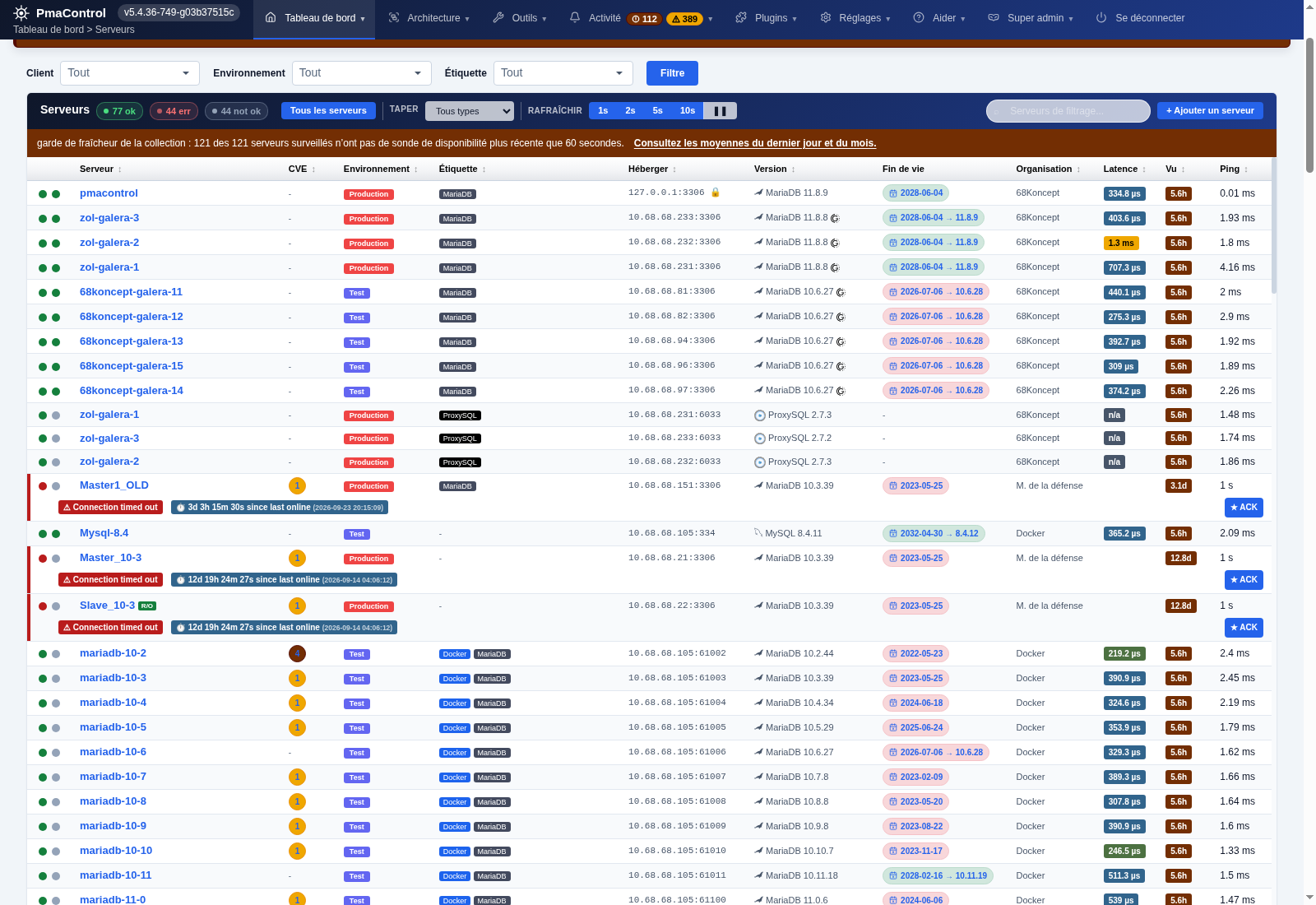
Server inventory, availability, versions and the latest collection time.
2. Galera + ProxySQL architecture
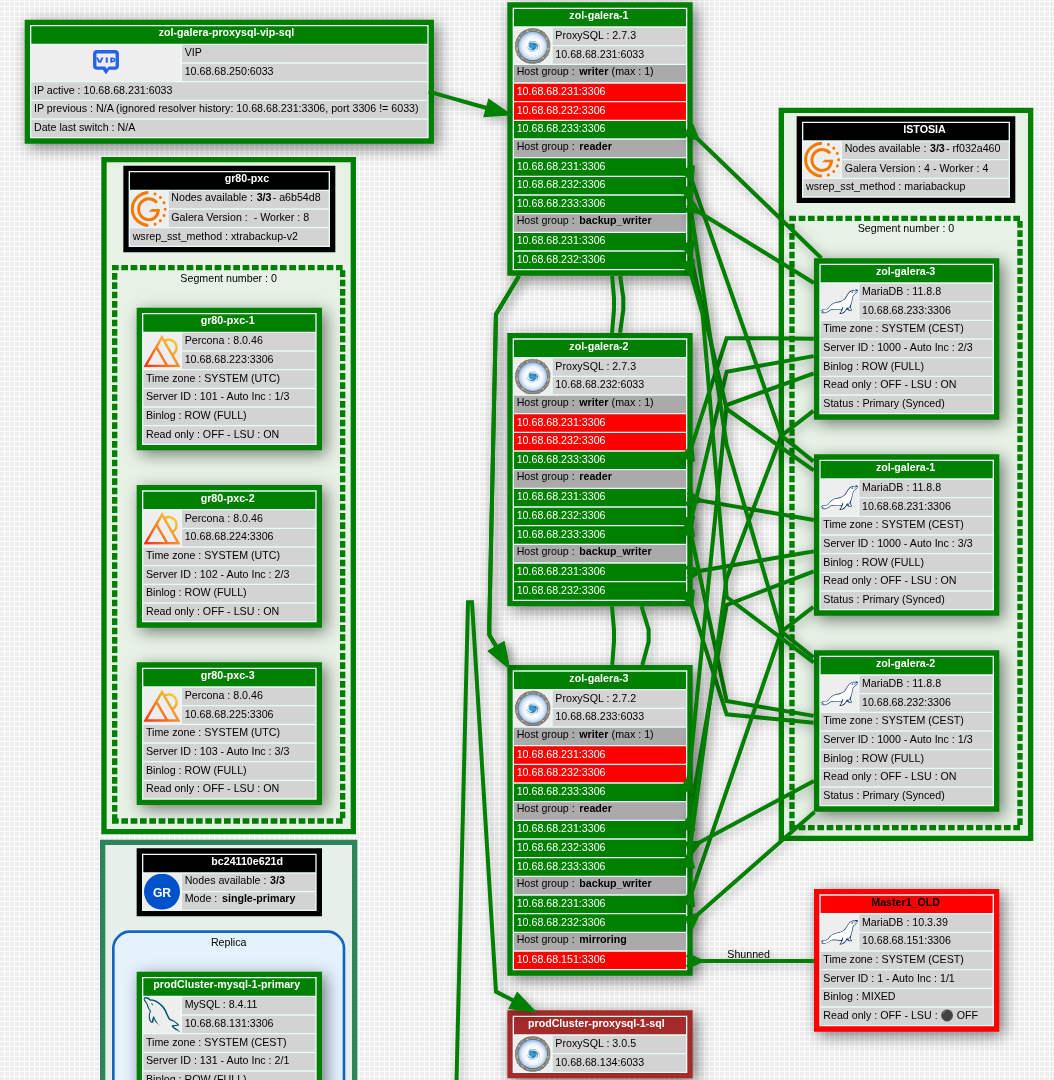
Visualization of VIPs, ProxySQL groups and Galera cluster members.
3. Alarms and incidents
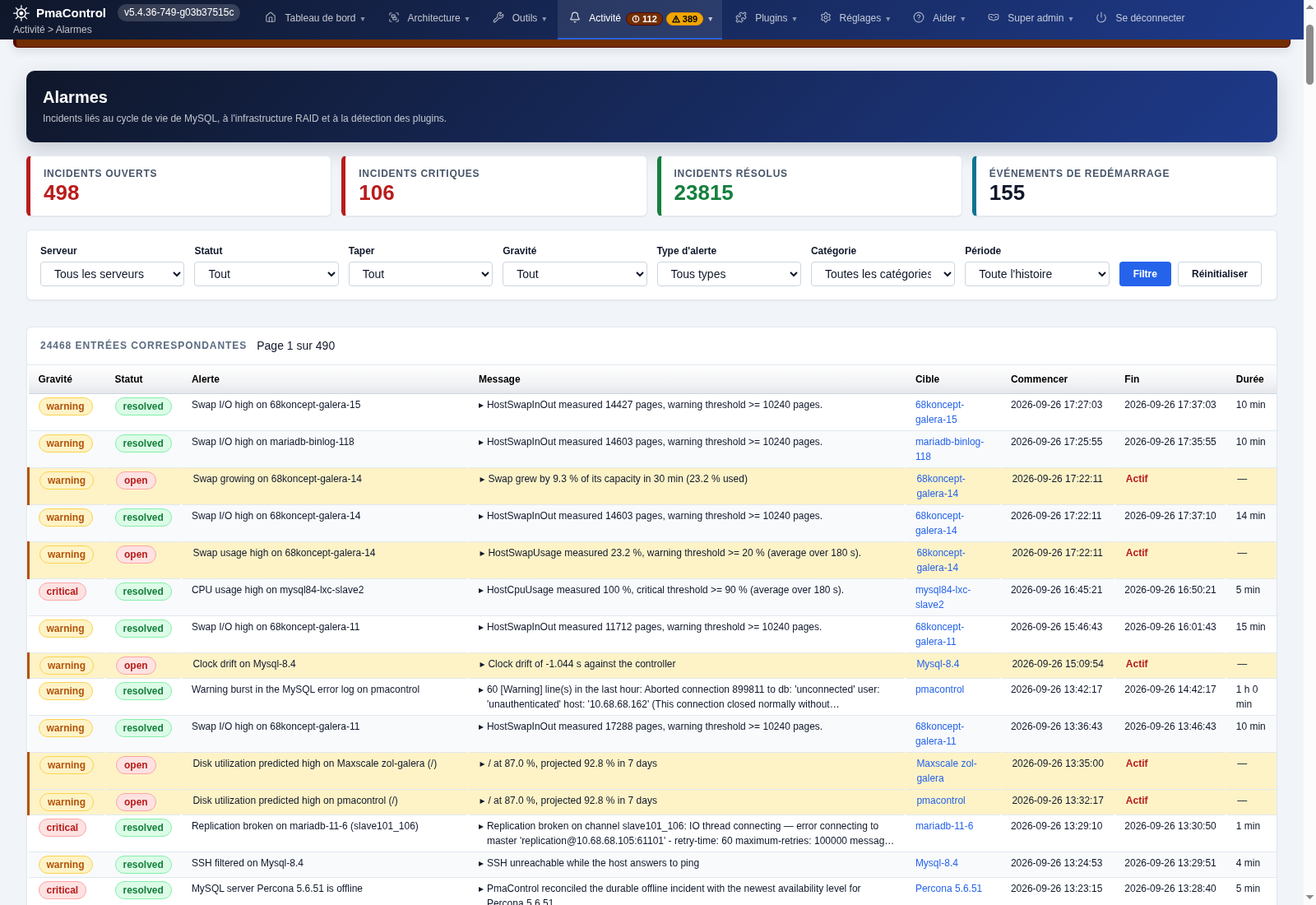
Open and resolved incidents, severity levels and filters by server.
4. Galera node status
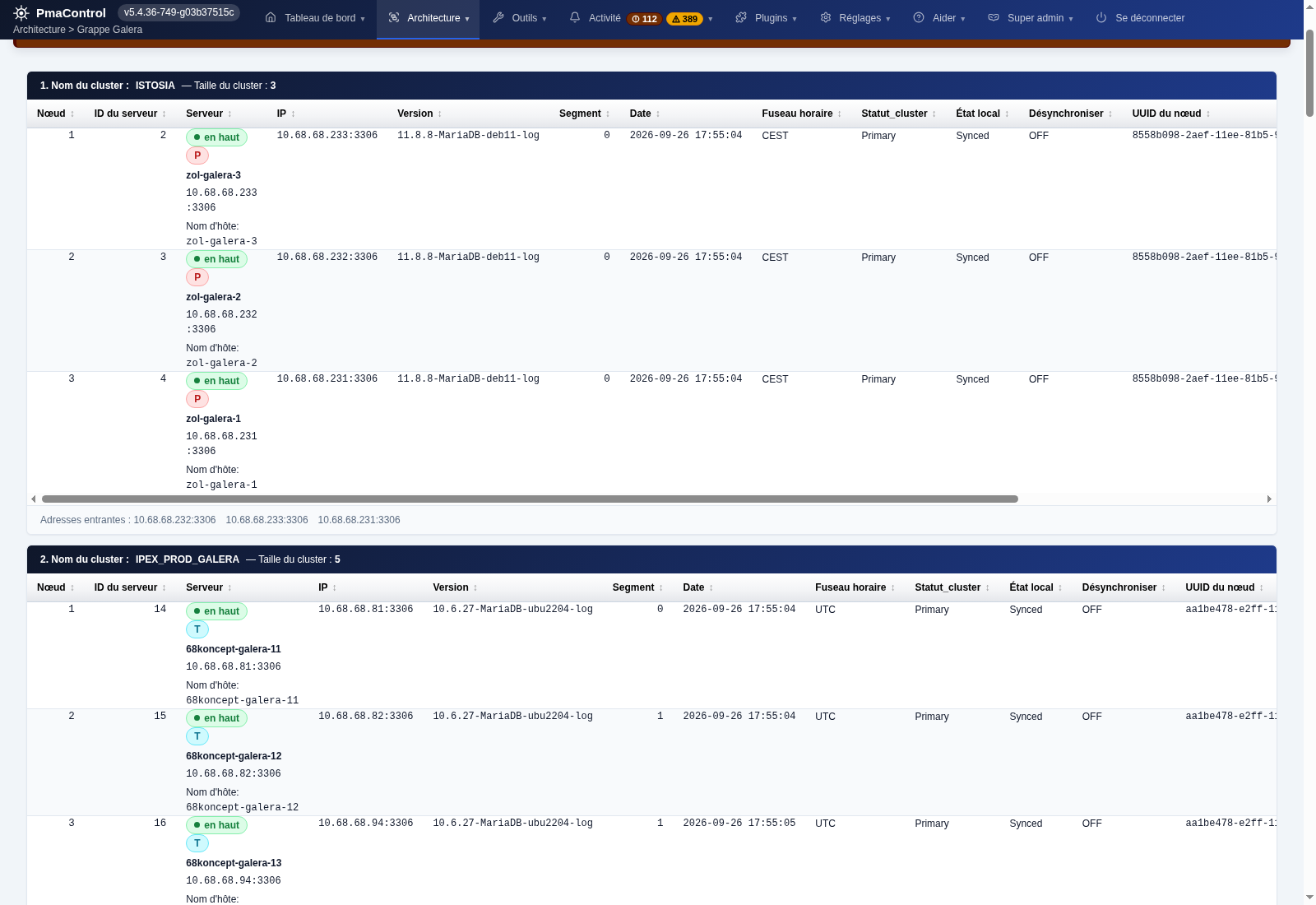
Cluster members, synchronization status, segments and versions.
5. ProxySQL hostgroups and routing
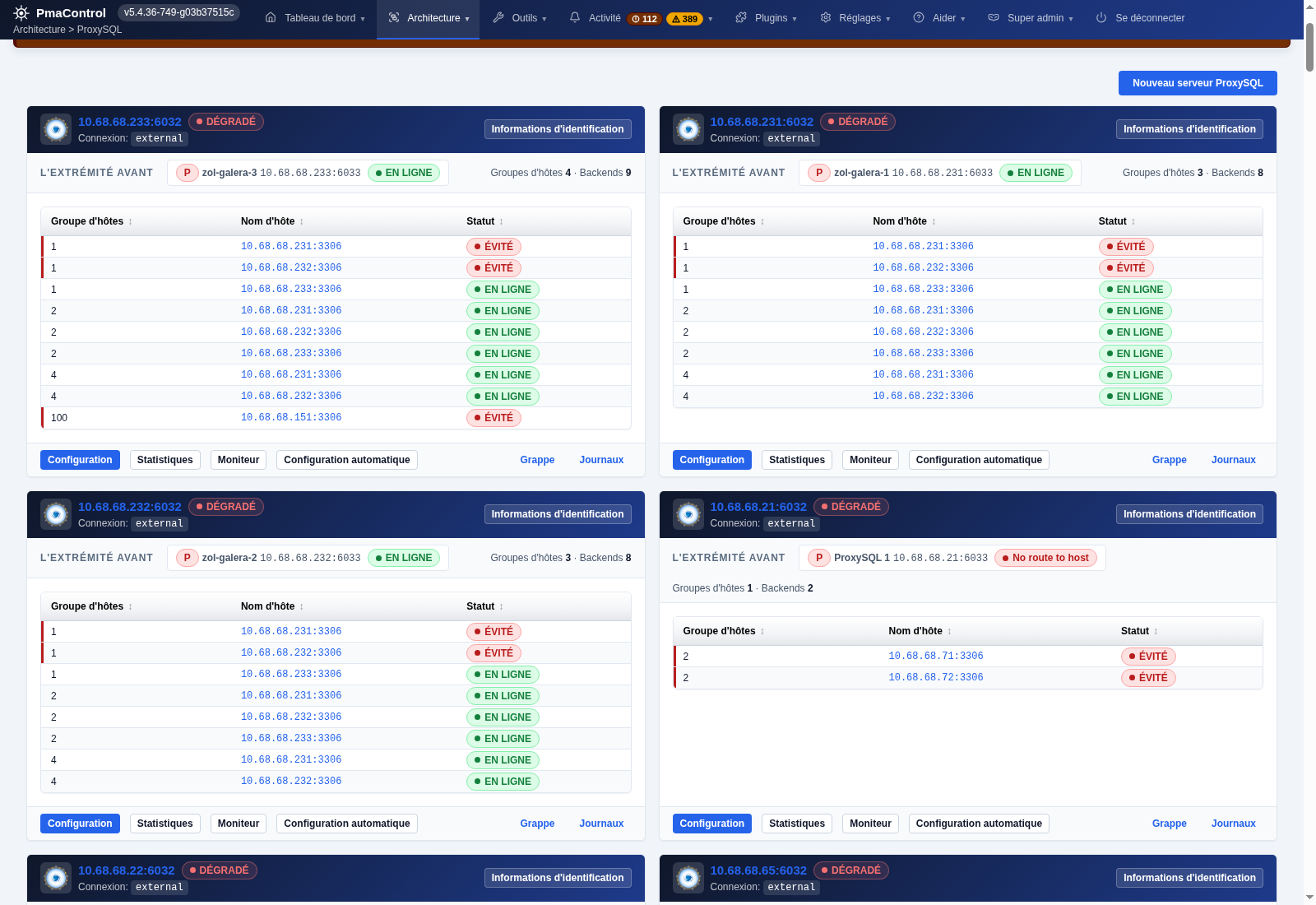
Writer and reader groups, backends and connection status.
6. Database memory
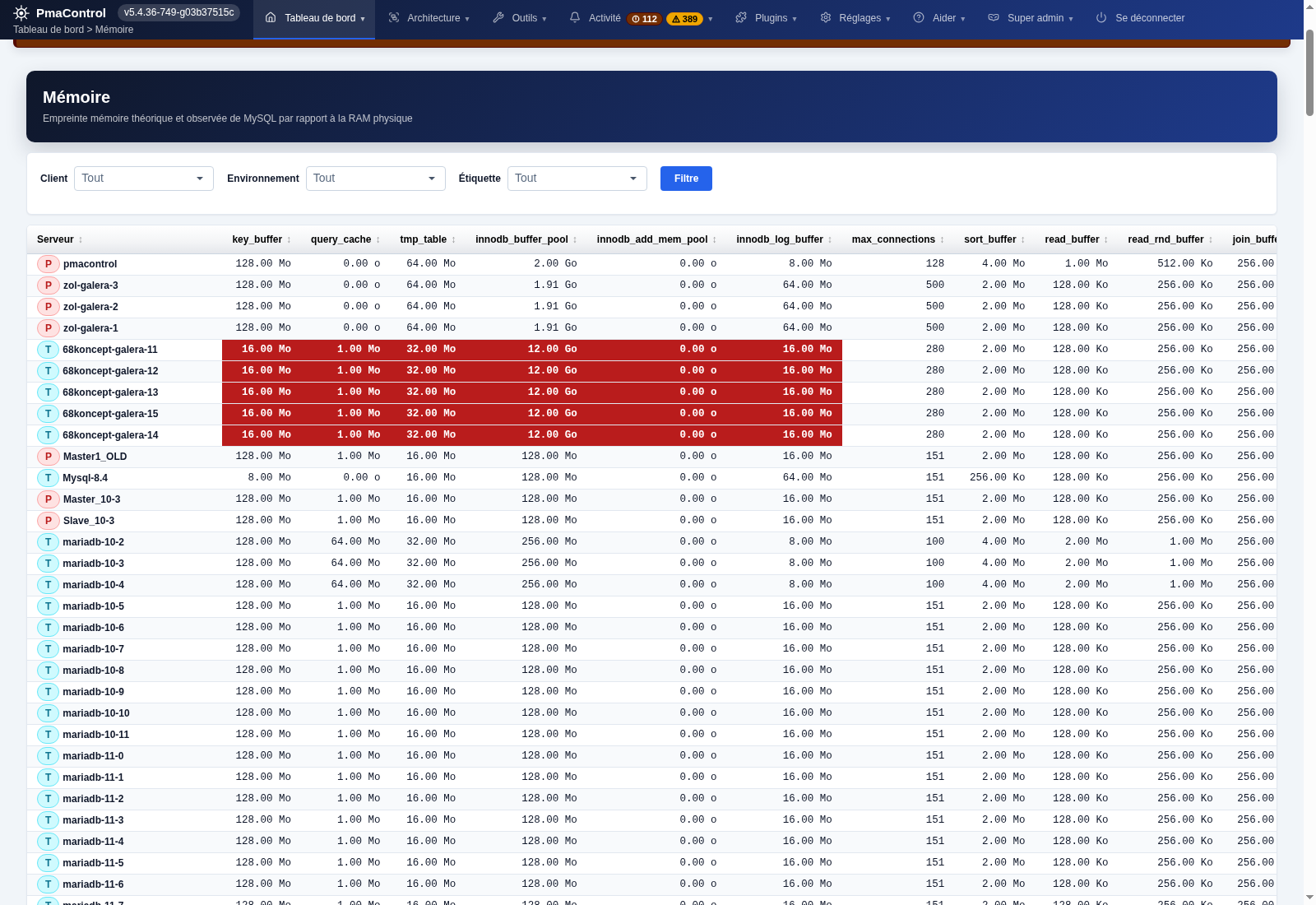
Comparison of buffers and memory settings for each server.
7. PmaControl capacity
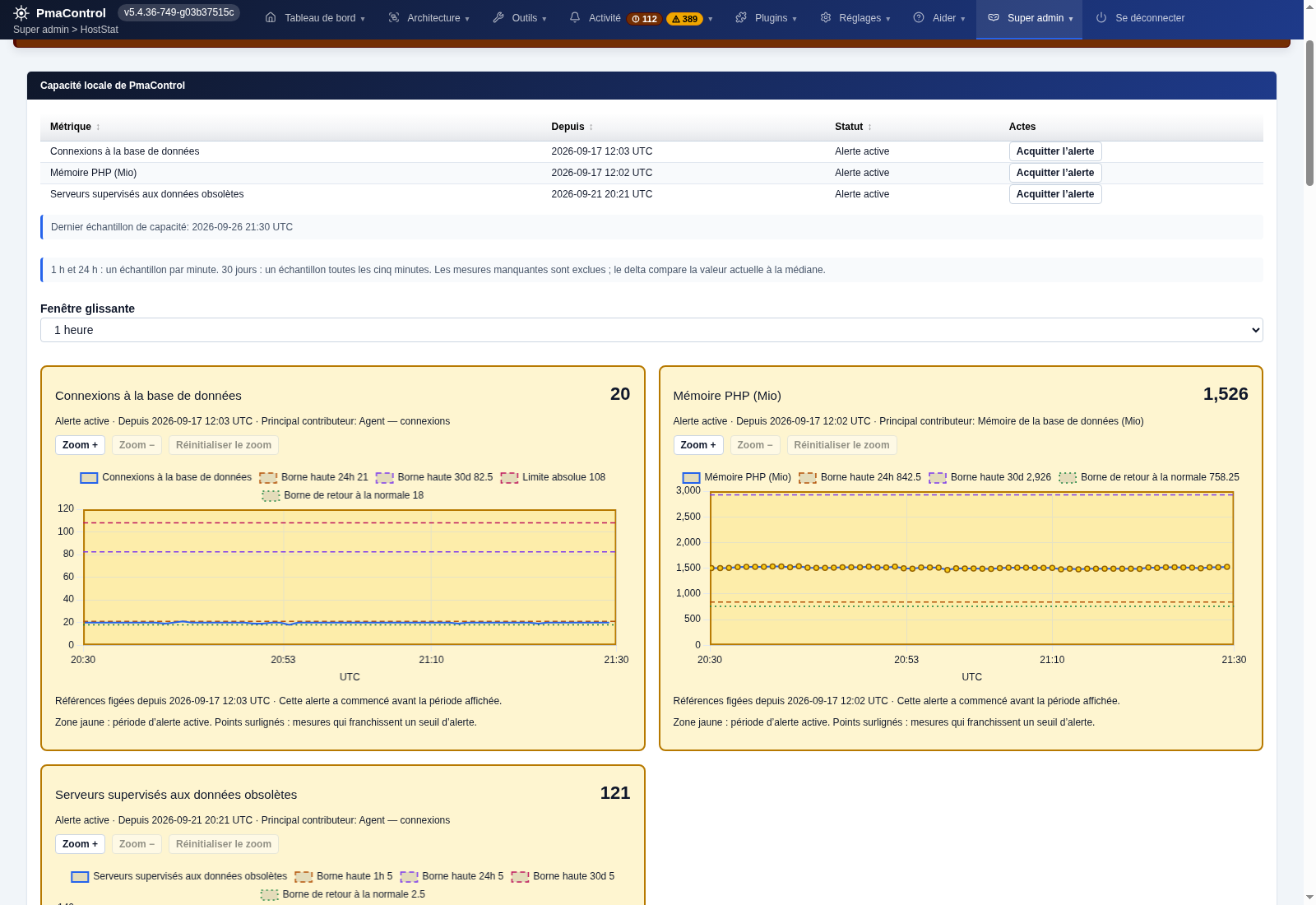
Charts for connections, memory and capacity alerts.
8. MariaDB replication
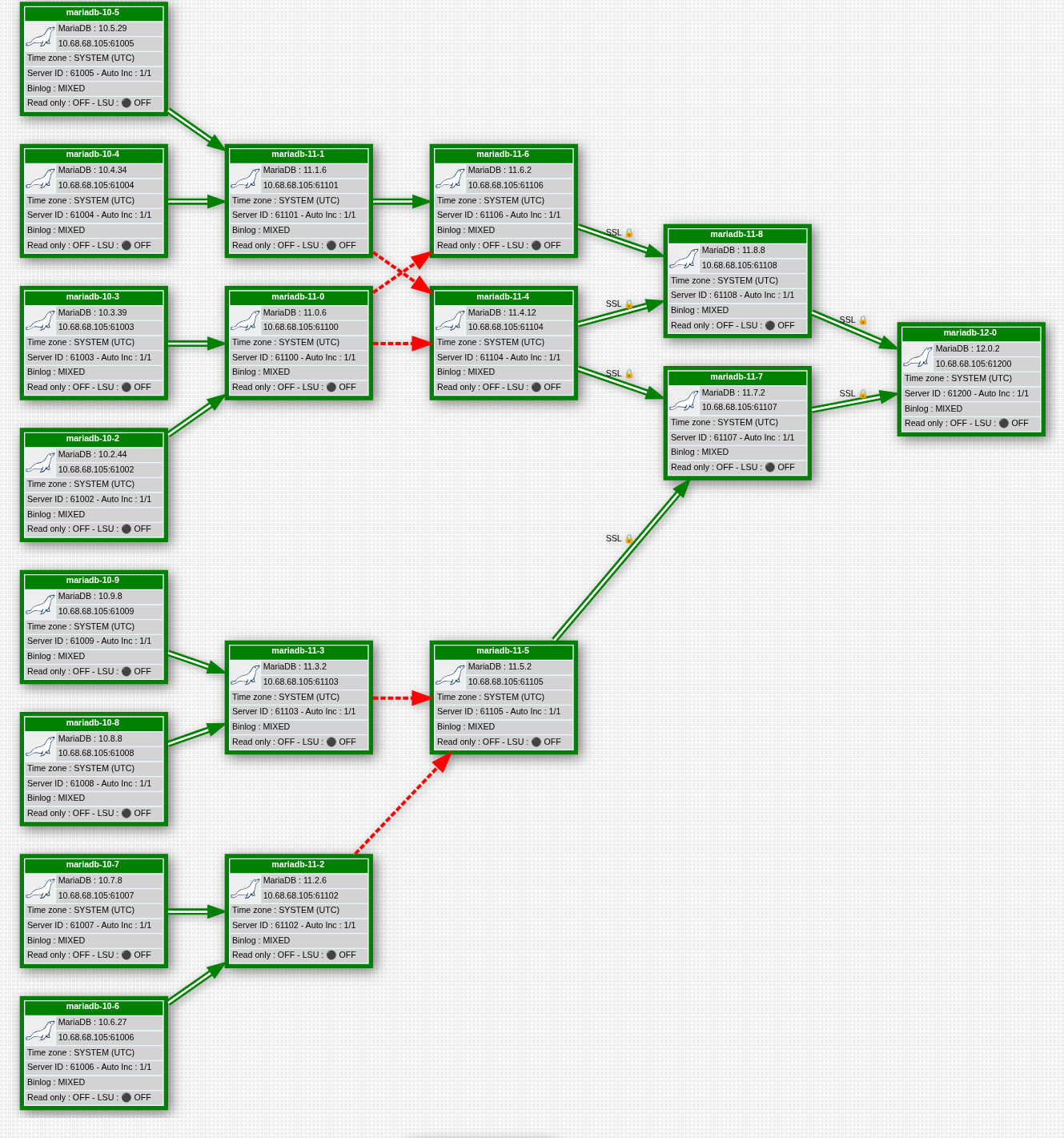
Sources, replication chains, versions and SSL links.
9. Backups and scheduling
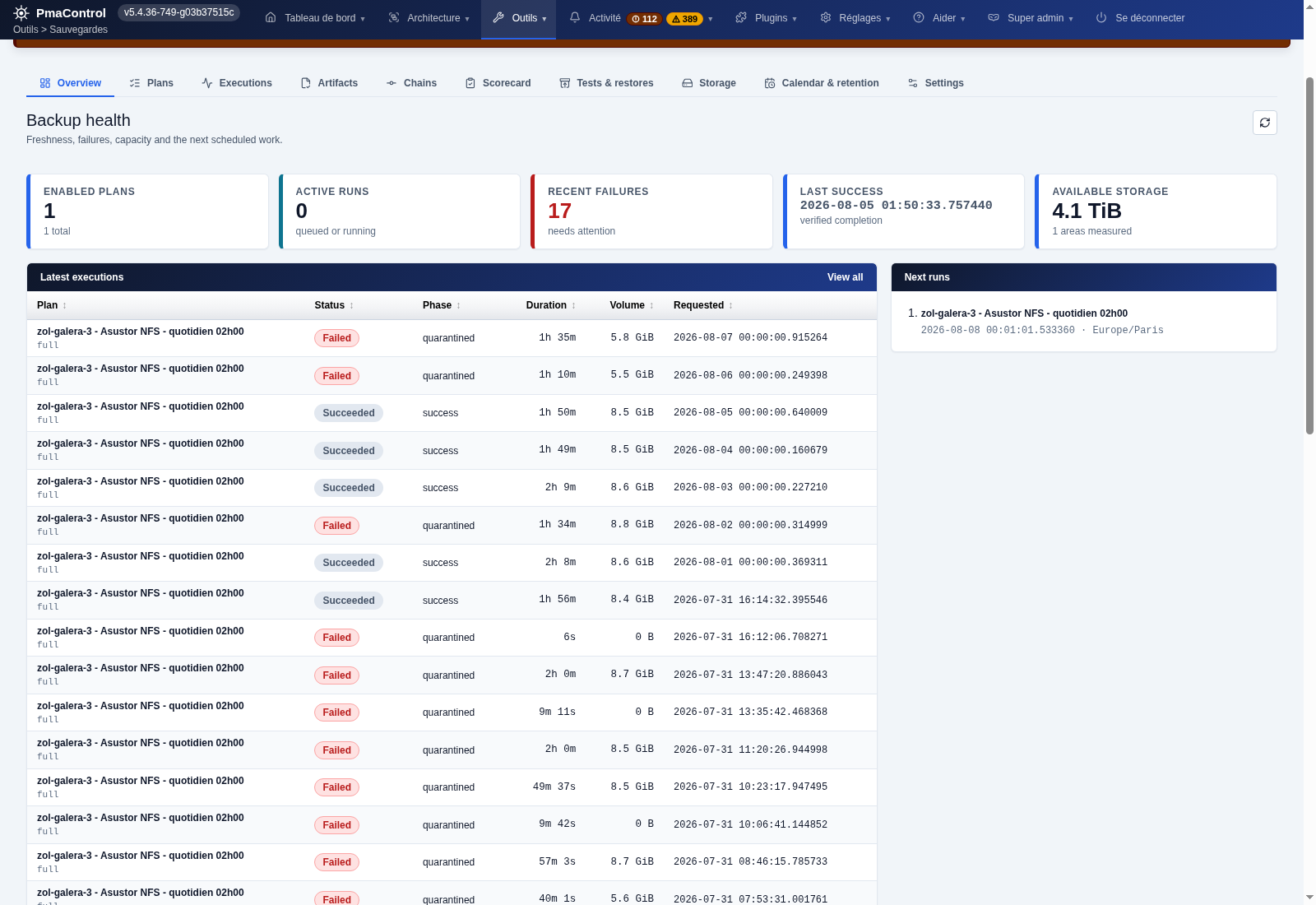
Execution history, storage space and backup scheduling.
10. Index usage
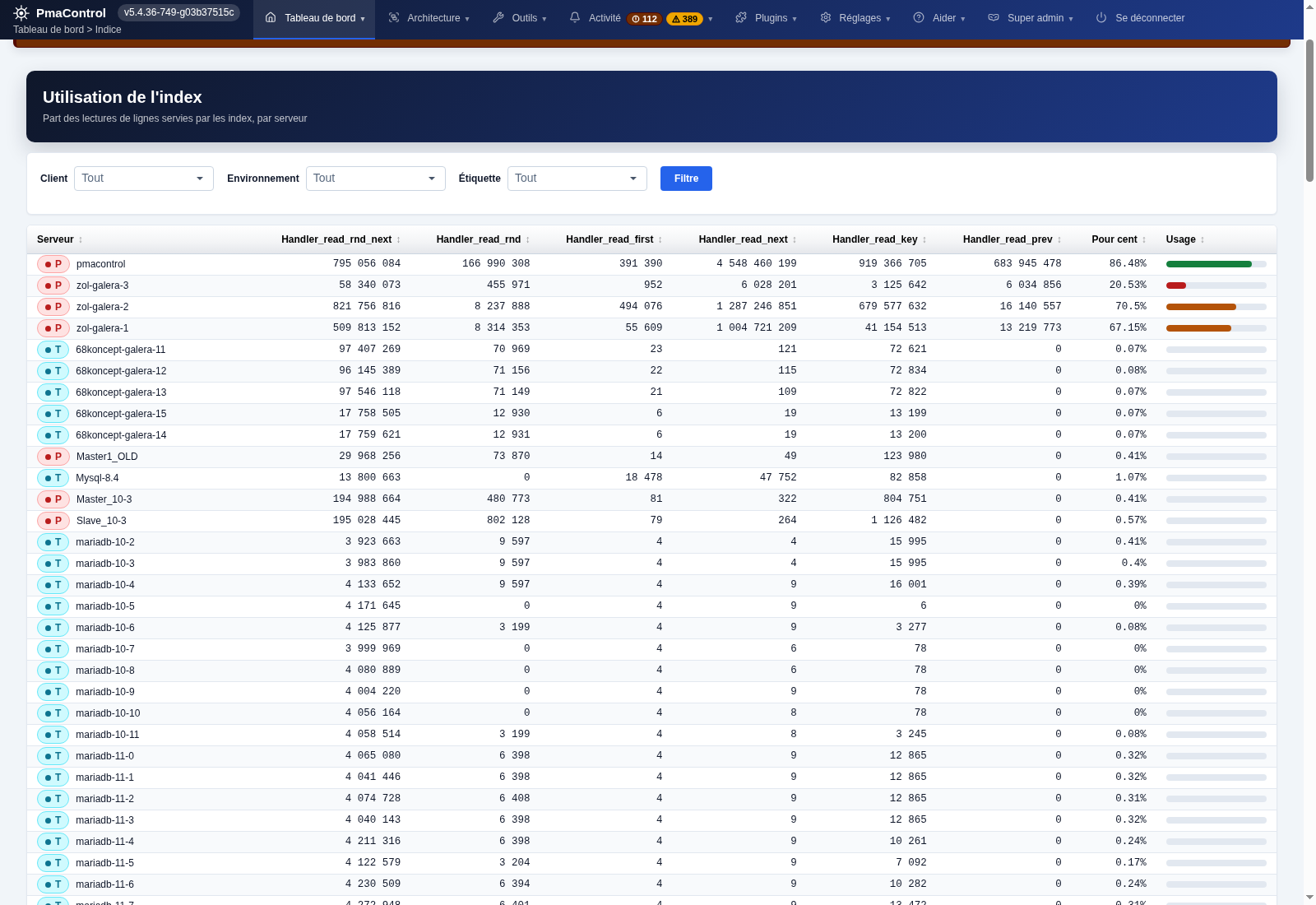
Read counters and the share of reads served by indexes.
9. Files, data and backups
The paths below apply to package deployment. Back up the local database, /etc/pmacontrol/, application data, certificates and recovery credentials. The application encryption key is part of the configuration: a SQL backup alone cannot restore encrypted credentials.
Use a MariaDB backup consistent with the storage engines present. A --single-transaction export alone does not guarantee consistency for every table when multiple engines are used. For file copies or snapshots, stop collection and MariaDB during a planned window, or use a backup mechanism validated for your engine and version. Test restoration on an isolated instance before relying on the backup.
/usr/share/pmacontrol/                 application
/usr/bin/pmacontrol                    CLI
/etc/pmacontrol/                       configuration
/etc/pmacontrol/frankenphp.d/           operator TLS policy
/etc/pmacontrol/trusted-proxies         immediate trusted proxy peers
/var/lib/pmacontrol/                   persistent application data
/var/lib/mysql/                        local MariaDB data
/var/cache/pmacontrol/tmp/              application cache and logs
/etc/frankenphp/php.d/pmacontrol.ini    packaged PHP settings
/root/pmacontrol-install.env            bootstrap recovery credentials
10. Upgrade PmaControl
Before upgrading, prepare a restorable backup of data and configuration and read the candidate version's release notes. Post-install applies migrations and returns daemons to their intended state; intentionally stopped tasks must remain stopped. The normal procedure upgrades the package rather than running git pull under /usr/share/pmacontrol.
After upgrading, repeat section 5 checks, a user login and collection freshness checks. A regression may require coordinated restoration of both code and database: reinstalling an older package does not roll back the schema.
sudo apt-get update
apt-cache policy pmacontrol
sudo apt-get -s install --only-upgrade pmacontrol
sudo apt-get install --only-upgrade pmacontrol
sudo dpkg --audit
systemctl is-active mariadb frankenphp cron
11. Docker: current status and deployment options
Status checked on September 26, 2026: the current repository does not provide a Dockerfile, Compose file or PmaControl image reference for a complete supported installation. Existing Docker files concern tools or test databases. Suggesting docker pull pmacontrol/pmacontrol without a published, verified image would be misleading.
The APT package uses systemd, local MariaDB, cron, file permissions and startup listener checks. Putting it into a generic PHP image does not reproduce that installation. A Docker port must handle initialization and retries, persistent volumes, secrets, migrations, daemons, health checks and tested restoration.
You can install PmaControl now in a Debian or Ubuntu VM using this guide and monitor MariaDB / MySQL servers running in Docker, provided their SQL addresses are reachable. localhost inside a container refers to that container, not the PmaControl VM. A procedure for installing PmaControl itself in Docker will be added with an image and reproducible tests; this must not be confused with monitoring containerized databases.
12. Diagnose an incomplete installation
Start with logs and package status. For an APT error, check suite, architecture, time, key and network access. For a port conflict, identify the service and decide where to host PmaControl; the package must not interrupt another site. For a TLS error, check DNS, challenges, certificate and permissions. If the web works but graphs are stale, check SQL/SSH connectivity, daemons and collection errors.
sudo journalctl -u frankenphp -u mariadb -u cron --since '-30 min' --no-pager
sudo tail -n 100 /var/cache/pmacontrol/tmp/log/error_php.log
sudo tail -n 100 /var/log/apt/term.log
sudo dpkg --audit
sudo ss -ltnp '( sport = :80 or sport = :443 )'
sudo ss -lunp 'sport = :443'
After fixing the reported cause, rerun configuration using these commands. A failed daemon rotation may also require sudo runuser -u www-data -- pmacontrol Daemon startAll, only to recover the saved state of that operation and verify a single JSON result with ok: true. Do not delete the encryption key or credentials file to force a new bootstrap.
sudo dpkg --configure -a
sudo apt-get -f install
13. Remove the package
First back up and verify the data you want to retain. Simulate removal, then remove the package if that is your intention. purge is a different operation and does not replace a retention plan. Operator TLS files may remain on disk; check retained services and data before reusing the machine.
sudo apt-get -s remove pmacontrol
sudo apt-get remove pmacontrol
14. Commissioning checklist
- The package is configured and required services are active.
- DNS and certificate match; normal access works without
-k. - Administrator and webservice credentials are stored securely.
- A MariaDB / MySQL server passes the connection test.
- Collection produces recent samples and consistent graphs.
- Privileges, retention and storage fit the enabled features.
- A complete backup can be restored on an isolated instance.
Sources and verification scope. This guide uses the official repository's installation scripts and documentation, plus the APT indexes and package 5.4.36-1 inspected on September 26, 2026. The index signature was verified. This documentation check is not a new installation test on each of the four distributions.
Comments (0)
No comments yet.
Leave a comment